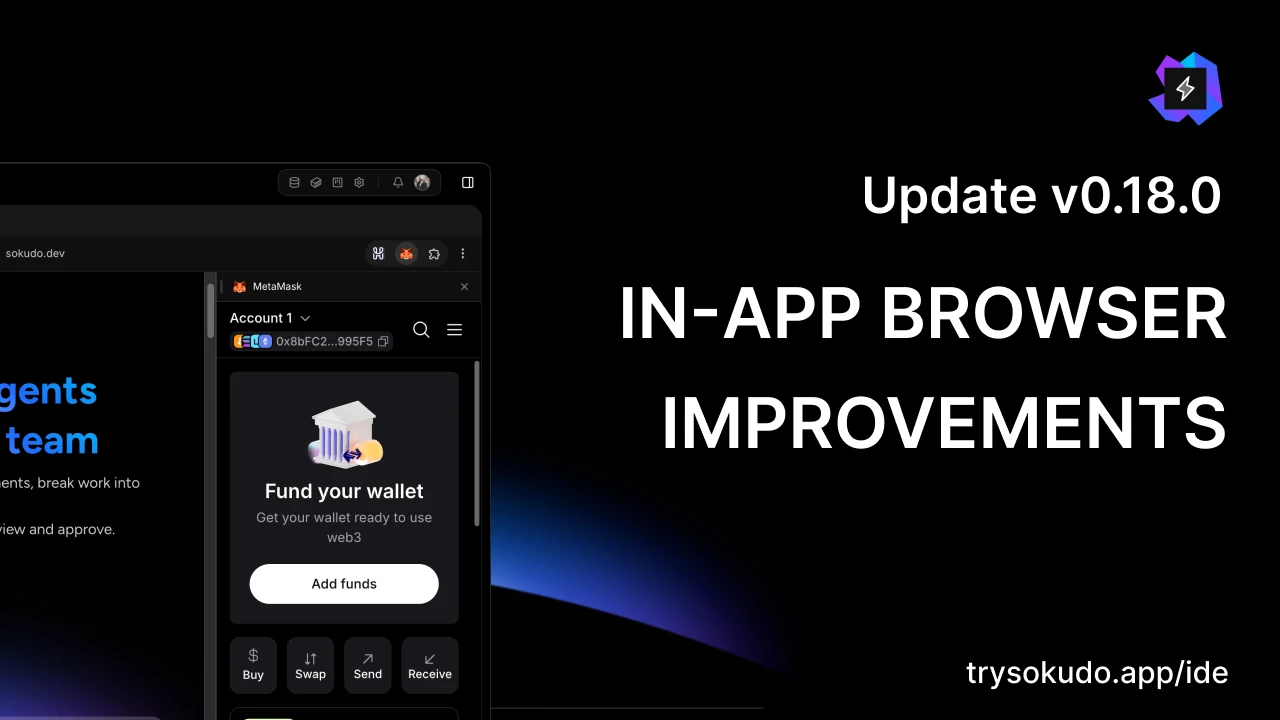
Sokudo v0.18.0 is here. This post rounds up everything shipped since v0.17.1, three releases from v0.17.2 to v0.18.0, and the headline is the in-app browser: on macOS and Linux it now runs Chromium's own Chrome runtime inside Sokudo, with Chrome Web Store extensions, saved passwords, and a profile of its own for agents. Alongside it, Jev AI moves to Jev 1.14.0, the All Workspaces dialog archives and restores workspaces in bulk, and about sixty fixes land across Windows, Linux and macOS.
The in-app browser, now fully Chromium
On macOS, every tab runs Chromium's full Chrome runtime (CEF 154, Chromium 154.0.8037.98) inside Sokudo. Each page renders in a frameless window attached to the Sokudo window, below the menus and the annotation layer, and the browser runs in Chromium's sandbox. Linux gets the same runtime on X11 and XWayland sessions: GNOME and KDE Plasma on Wayland use XWayland for it, and a pure Wayland session without XWayland keeps the previous engine. The deb uses the setuid helper and the AppImage uses user namespaces, so the sandbox is on there too.
Windows keeps WebView2 behind the same new interface. Chromium's Chrome runtime draws and runs extensions on Windows, but its sandbox hand-off crashes in this CEF build and no unsandboxed engine ships, so it follows in a later release. One thing to know on Windows: website sign-ins need one sign-in again after this update, because tabs moved to their own data folder. Your Sokudo sign-in is kept.
Toolbar, address bar and menus
The toolbar is Chrome's: back, forward, reload, an address bar with history suggestions, the extensions pill, and the tab menu and browser menu as cards above the page. The address bar has a site-information button for the connection state, cookies and site data with a one-site clear, and a Show full URL setting. Find in page, zoom, print and Save as PDF route once, with no duplicate Chrome bubble. Links have two settings: web URLs can open in your default browser, and local development URLs can open in Sokudo.
Extensions, passwords and autofill
Extensions install from the Chrome Web Store through Chrome's own dialog on macOS and Linux. Their icons land in the toolbar pill, popups open beside the icon and close on Escape or a tab switch, and an extension's side panel docks beside the page on macOS, the way MetaMask's does in the video, or opens as a tab on Linux.
Saved passwords are on for your tabs: Chrome's save bubble and the fill dropdown, managed from the Password manager section of Settings > Browser, in Sokudo's style, and passwords import through a file you export from your browser. Contact-info autofill for addresses is on with a Save and fill toggle; payment methods stay off.
Agents browse in a profile of their own, on every OS: no saved passwords, no autofill, no extensions, separate cookies. If a task needs a site that is signed in, sign the agent tab in yourself and that sign-in stays in the agent profile. Clear browsing data covers both profiles and says what it removed for you and for agents.
Annotate and E2E
The annotation panel has the ChatGPT field set: text, colors, opacity, font, borders, size, padding and margin with locked pairs, and flex layout, with a live preview that reverts on Cancel. A setting decides whether annotation screenshots go to the agent (always or never, always by default), and staged annotations show their screenshot on hover. E2E run tabs close when the run ends; a run whose last flow failed keeps its page, marked with a flask in the tab strip, until you navigate it.
Two limits to know. Touch ID is unavailable to sites and extensions inside the browser on macOS, because Chromium ties it to a keychain access group baked into the engine build; password sign-in works. And an extension whose icon has no popup page, such as HashPack, cannot be opened from the pill yet; its content scripts and its own pages still work, and the icon click follows in v0.19.0.
Jev AI moves to Jev 1.14.0
The small decisions Sokudo hands to Jev AI (which repository a message is about, what a turn needs, whether a message you type mid-turn should queue or steer, whether a worker's question is answerable from its ticket) now run on Jev 1.14.0, TypeSafe's latest model, released on October 14. TypeSafe describes it as small, broad refinements with the largest gain in multilingual support. Sokudo pins the model by its versioned id rather than by "latest", so a model change never moves your decisions under you, and the thresholds behind nine of those decisions were measured again on the new model with a live run of the whole suite before the version switched.
Bulk Archive and Restore
The All Workspaces dialog gained an Archived tab in v0.17.0; it now acts on many workspaces at once. Every workspace this device has opened gets a check square on the Active tab, a line under the search shows "N of M selected" with Select all and Deselect all, and a bar at the bottom offers Archive N, with one confirmation. Archived workspaces are hidden from the switcher on this device; your files stay where they are. The Archived tab works the same way with Restore N, no confirmation needed, and a workspace whose folder is gone is dropped with one notice instead of blocking the rest. A search narrows what the buttons cover, and each tab keeps its own selection.
Also new since v0.17.1
- v0.17.2: a frozen window is noticed and recoverable. A renderer that stops answering is detected from the native side, reported, and recoverable from View > Reload Window.
- v0.17.3: Antigravity's model picker follows agy 1.3.5. Gemini 4 Argon leads the list, and Claude Opus 5.5 and Claude Sonnet 5.5 join with their effort tiers.
- Claude Sonnet 4.6 is in the Claude picker, and Claude Sonnet 5 and Sonnet 5.5 are billed at their published cards in the usage popover: Sonnet 5 at $2 and $10 per million tokens, and Sonnet 5.5 cache hits at $0.10.
- The engine update bell. A newer managed Docker engine bundle is announced in the toolbar bell even when it cannot be installed yet, naming why, and the check runs again on a cadence instead of once per launch.
- Clarify answers continue under the card. When an agent asks a Clarify card and you answer, its continuation now lands under the card instead of above it, and the card's footer says which CLI is continuing while the turn runs.
- Hints on the AI git buttons. "Generate with AI" in the commit box and "Resolve with AI" on a conflicted file say on hover where a model comes from when none is picked.
- A deleted chat says so. A chat deleted while its tab stayed open shows "This chat was deleted" and takes no more sends.
Bug fixes, performance and stability
Every stable Sentry issue of the last two weeks was read from its events, and about sixty fix commits came out of it. On Windows, the terminal panel could open black: the console's startup query left before the window could answer it, so the shell was never served. It now waits for the window. A claude turn that exited on its own on Windows hid behind a ninety-second timeout and a generic sentence; the exit is read within a second now, with the CLI's own words. Claude's folder-trust pre-seed covers symlinked and non-ASCII folders, a 429 on claude's startup check no longer ends a turn as a rate limit, and a session create that opencode's server leaves unanswered is probed and sent once more. The chat transcript no longer draws rows over each other after a card grows while the turn runs, and a design node's annotation pins follow the page when you scroll it.
The managed Docker engine fixes seven located defects (startup grace, its own stop, desired-state writes, a blocked relay, an empty install, a missing image, a full disk), and on Windows a stalled engine is healed by a real restart. Language servers are given their handshake time instead of being killed and respawned, and on Linux every child the AppImage starts, language servers, git, gh, codex's hook probe and opencode included, gets the image's loader libraries scrubbed from its environment. Swarm workers' git work survives long paths, a locked index and racing merges; the watchdog excuses hidden pages and suspends; a network failure during an update download retries; and an indexing service outage reads as the service being unavailable, not as a problem with your folder.
Every app below v0.18.0 takes this release as a required update. As always, Sokudo updates itself. The public beta is open at sokudo.dev, so try v0.18.0 and tell us what you want to see next.
- Changelog
- Product