Sokudo v0.16.2 is here. This post rounds up everything shipped since v0.15.0 — eight releases from v0.15.1 to v0.16.2 — and the headline is the biggest feature Sokudo has added since the public beta opened: a full Database Manager, built into the IDE and wired into your agents. Alongside it, Kiro CLI becomes the eighth coding agent, Claude Haiku 5.5 and GPT-6.1 Sol join the model pickers, and a long run of fixes lands on Windows, Linux and macOS.
Database Manager
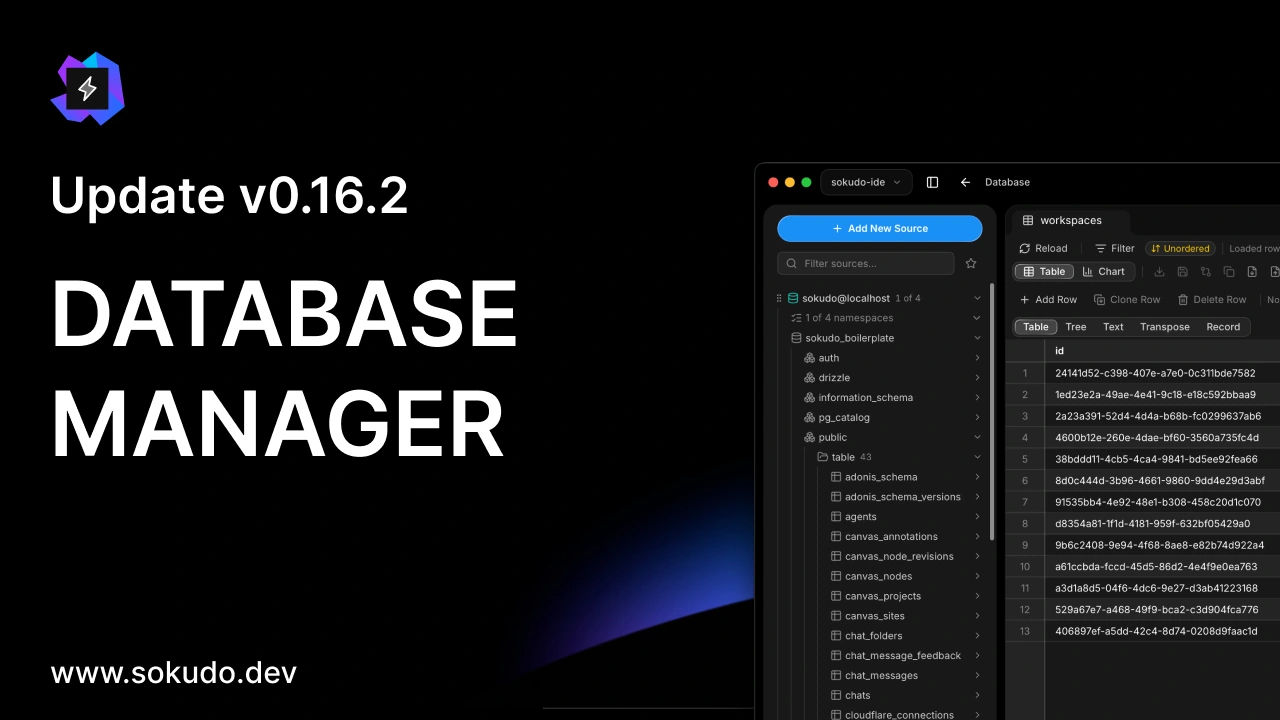
Open the Database Manager from the workspace toolbar and you get a three-pane layout in the style of DataGrip: your data sources in an Explorer on the left, consoles and data grids in the middle, and a database chat on the right. Everything runs in a native Rust core behind the UI, so a long query, a big export or a dump never blocks the editor, and you can keep working elsewhere in Sokudo while it runs.
It speaks to 29 engines on day one, grouped in the picker by what they are:
- Relational — PostgreSQL, MySQL, MariaDB, SQLite, Microsoft SQL Server, CockroachDB, QuestDB, rqlite, ClickHouse and DuckDB, plus Oracle, Firebird and H2 through a managed JDBC runtime.
- Document and key-value — MongoDB, Redis (standalone and Cluster), Apache CouchDB and Amazon DynamoDB.
- Search and vector — Elasticsearch, Apache Solr, Meilisearch and Qdrant.
- Brokers and registries — Apache Kafka, RabbitMQ, Apache Pulsar, MQTT, Apache ZooKeeper, etcd, Consul and Nacos.
Each engine shows its capability level — Connect, Browse, Understand, Operate or Broker — before you connect, and the UI only offers what that engine can actually do. More engines are already built and waiting on their certification runs; an engine appears in the picker only once it has passed, never half-working.
Adding a source is a dialog with a Test connection, or a one-click adopt: Sokudo discovers databases running in the workspace's Docker containers and DATABASE_URL values in its .env files, and fills the form for you. Passwords go to your OS keychain by default, SSH tunnels and SOCKS5 or HTTP proxies are built in, and TLS is configured per source. DuckDB and the JDBC engines run on managed runtimes that Sokudo downloads on first use, after a consent card lists each component with its size, licence and origin; every file is verified against a manifest signed with Sokudo's release key, and no system Java is ever used.
Consoles get a real SQL editor with completion from the live schema, multi-statement scripts, explicit transaction control, a read-only switch per source and a confirmation before anything destructive. Results open in a strip under the editor — table, tree, text, transposed or record views, with explain plans and their diagram — and any result can be detached into its own tab. Data grids page as you scroll, sort and filter, and edits are staged until you apply them, with optimistic conflict detection so you never overwrite a row someone else changed. A typed value editor, foreign-key navigation, charts and a geometry preview are a click away, and MongoDB and Redis get their own console grammars and viewers.
Around the consoles sit the tools you would otherwise open a separate app for: import and export (CSV and other delimited files, JSON, XLSX, SQL INSERT scripts, BSON for MongoDB), dump and restore through pg_dump, pg_restore and mysqldump, SQLite backups and a built-in MongoDB dump, schema compare and data compare that generate the DDL or sync script into a console for you to review, a table structure editor that does the same for DDL, data transfer between sources, a bounded content search across selected tables, query history, and an ER diagram whose inferred relationships you confirm, with a layout that is saved per source.
The right pane is the part that makes it Sokudo. Ask in plain words — the demo above asks for the most active workspace — and the agent answers with a SQL card: the statement, the source and namespace, and how the native analyzer classified it. A read runs when you press Execute, in a console in the main panel, and the rows stay in native memory. A write runs inside a transaction the conversation holds, shows the rows it matched before and after, and commits only when you choose Commit; a statement that cannot run in a transaction says so on the card before you execute it. The same reach extends to the main Chat: mention a source with @database: (or @table:, @column: and friends), and results land in a Database view beside the conversation.
Agents use a dedicated Database tool family through Sokudo's MCP server. Read tools are on whenever the Database Manager is; write tools sit behind a per-workspace opt-in under Settings → MCP, with a second opt-in for DDL. Per source you choose what agents may see: full access, schema only, or nothing at all. A stored password never reaches a prompt, a tool result or a chat transcript.
Two point releases followed within a day of v0.16.0. v0.16.1 put DuckDB, Oracle, Firebird and H2 back in the picker on a fresh install. v0.16.2 made the keychain the default place for a password (a password kept only until restart used to vanish on relaunch, leaving a source that could not load), added an in-place password prompt for a source whose credential is gone, and wired up Edit Source, Duplicate, Export and Import in the source menu.
New coding agent: Kiro CLI
Kiro CLI joins Claude Code, Codex, Antigravity, OpenCode, Grok, Muse and Pi as the eighth coding agent you can run inside Sokudo. Turn it on under Settings → Providers → Kiro CLI, sign in with kiro-cli login in your own terminal, and press Re-check. Sokudo adds no login of its own and never installs the CLI for you.
Kiro runs in a real terminal session, the way Claude Code and Codex do, with its traffic routed through Sokudo's local proxy, so every seam the other agents use works: the same chat and workspace context, steering a running turn, the permission gate (Kiro's own approval menu is answered by Sokudo's prompt), and every role from lead to worker to the background jobs. Its model list comes from your Kiro account with Auto as the default, and a per-model effort level appears when the model reports one. Kiro bills in credits rather than tokens, so the usage popover shows a credits card: what each turn cost, and your plan's used and remaining credits with the reset date. Kiro CLI is supported on macOS, Linux and Windows 11; Sokudo was tested with Kiro CLI 2.26.
New models: Claude Haiku 5.5 and GPT-6.1 Sol
The model pickers caught up with October's releases:
- Claude Haiku 5.5, released on October 7, is in the Claude Code and OpenCode pickers, listed ahead of Haiku 4.5, which stays available. The usage popover prices it correctly, including Anthropic's higher rate for prompts over 100K tokens.
- GPT-6.1 Sol now leads the Codex picker, ahead of GPT-6 Astra, Sol and Luna, with its own effort ladder from low to ultra and its price card in the usage popover.
While on models: when the model that answered is not the one you picked, the composer now says which one actually served the turn — on every provider.
Also new since v0.15.0
- Files panel, rebuilt. A Rust scanner modelled on Zed's behind a VS Code look: every file is shown, including dotfiles, git-ignored entries are dimmed, git status colours mark files and roll up onto folders, folders get per-type icons, and a 50,000-file workspace paints at once. The viewer previews SVG, images, audio and video.
- Source Control history as a graph. The HISTORY list draws branches as lanes, like VS Code's Source Control Graph, and a commit opens as a diff.
- OpenCode 2. Sokudo drives OpenCode 2.x through its new API — sign-in, the model catalog, the usage meter, permissions and the swarm — and you connect providers from inside Sokudo. OpenCode 1.x keeps working until the end of October 2026.
- Terminal links behave like VS Code's. Modifier-click opens a link, hover shows the real target, and only safe schemes open.
- Resolve with AI on merge conflicts runs one bounded turn per hunk instead of a whole agent session.
- Icons ship in the bundle, so the app no longer fetches them from the network and looks right offline.
Bug fixes & stability improvements
Eight releases from v0.15.1 to v0.16.2 also carry fixes across the app. The ones you are most likely to have met:
- Windows — the terminal that went silent on v0.15.0 was the pseudoconsole's startup cursor query, now answered; v0.15.2's crash loop on launch was an async command overflowing the main thread's 1 MiB stack, now 8 MiB; a prompt over the Windows argument budget no longer hangs an Antigravity turn; a Tauri update ends a keyboard re-entrancy deadlock; and Codex on Windows gets a typed-history budget that keeps the composer fast.
- Linux — the app picks WebKitGTK's renderer itself, with DMA-BUF off on NVIDIA and after a renderer death, so the window no longer comes up blank; the bundled engine can open a user namespace on Ubuntu through an AppArmor profile.
- macOS — Cmd+Q, SIGTERM and every other quit path route through one shutdown driver, a missed cookie flush no longer holds the quit, and relaunching while the previous instance is still closing keeps the in-app browser.
- Network — requests that are safe to repeat ride through an app-service redeploy, and a rate limit that arrives before any output is reported as the limit, not as an empty turn.
- Agents — a CLI that refuses its startup check is no longer mistaken for a rate limit; a reply the network lost is retried once and you are told; a worker that stalls or exits early says why in plain words; swarm persistence backs off after five failures instead of retrying every 21 seconds for hours.
- Privacy — no file path, branch name, URL or quoted error text rides on any diagnostic line sent to Sentry, and the Database Manager follows the same rule for query text and rows.
As always, Sokudo updates itself. The public beta is open at sokudo.dev — try v0.16.2 and tell us what you want to see next.
- Changelog
- Product